Put your brand on what clients see
Show your agency's name, logo and colour to your clients instead of Ladoo's: in their emails, dashboard, sign-in page and chat widgets.
By the Ladoo team · Updated
On the Agency plan, your clients can see your brand instead of Ladoo's. Once you set it up, it applies to every one of your client workspaces.
What your clients see
- Emails: invitations, sign-in links and the morning summary show your name, logo and colour. When a client replies, the reply goes to your support email.
- Dashboard: your logo and name sit at the top of the sidebar, and the browser tab shows your name and icon.
- Sign-in page: your own sign-in link shows your logo.
- Chat widgets: you can hide the "Powered by Ladoo" line.
- Phone calls: callers never hear Ladoo's name. The agent uses the business's own name, and the call notice says "our service providers".
Your own agency workspace still looks like Ladoo. Only your clients' workspaces carry your brand.
Set up your brand
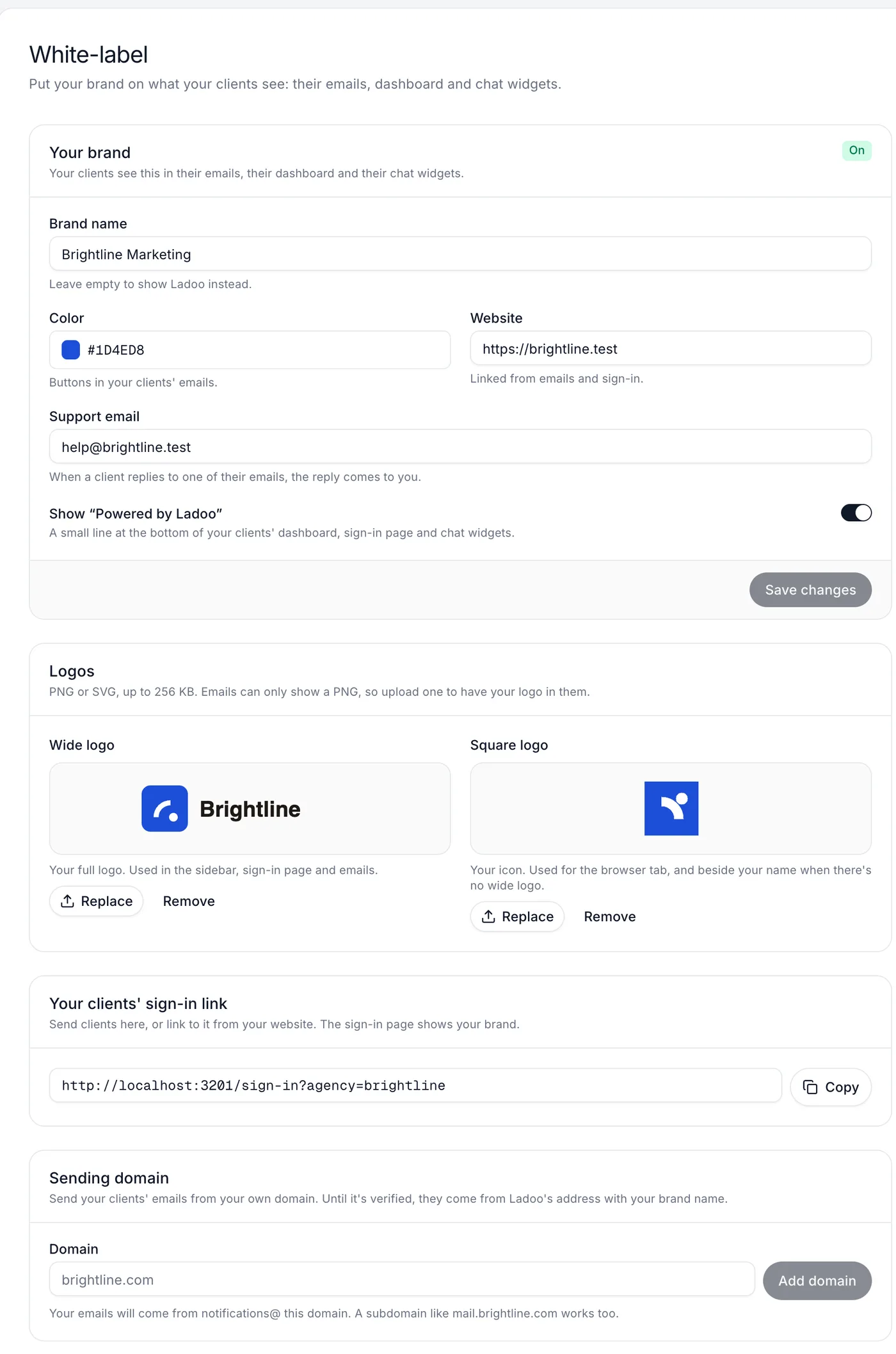
- In your agency workspace, go to Settings → White-label.
- Enter your Brand name, and if you like a Color, Website and Support email.
- Click Save changes.
The badge at the top right says On once your clients see it. To go back to Ladoo's branding, clear the brand name and save.
Add your logos
Under Logos, upload one or both:
- Wide logo: your full logo. It's used in the sidebar, on the sign-in page and in emails.
- Square logo: your icon. It's used for the browser tab, and beside your name when there's no wide logo.
Logos can be PNG or SVG files, up to 256 KB. Email apps can't show SVG images, so upload a PNG if you want your logo in emails. Without one, emails show your name in text.
Hide "Powered by Ladoo"
A small "Powered by Ladoo" line shows at the bottom of your clients' dashboard, sign-in page and chat widgets. To hide it, turn off Show "Powered by Ladoo" and save.
Give clients your sign-in link
Under Your clients' sign-in link, click Copy. Send that link to your clients or put it on your website. It opens a sign-in page with your logo.
Clients who sign out land back on that page.
Send email from your own domain
By default, your clients' emails come from Ladoo's address, under your brand name. To send them from your own domain instead, for example notifications@youragency.com:
- Under Sending domain, enter your domain and click Add domain. A subdomain like mail.youragency.com works too.
- Add the records shown to your domain's DNS. You do this wherever you manage your domain, such as your registrar or web host.
- Click Verify.
DNS changes can take a few hours to show up. If it isn't verified yet, click Verify again later. Until your domain is verified, emails keep coming from Ladoo's address, so nothing is lost while you wait.
To stop using your domain, click Remove.
What stays the same
- The sign-in page still says your clients agree to Ladoo's Terms, because Ladoo runs the service.
- The help center is Ladoo's.
- Your clients open their dashboard at Ladoo's web address. Your own dashboard address isn't available yet.
Related guides: Minute caps and usage per client, Bill clients through your Stripe and Client workspaces for agencies. For the Agency plan at a glance, see Ladoo for agencies.
Still stuck?
Ask our support agent (it runs on Ladoo), or email the team.