Talk step: have a conversation with a goal
The Talk step in a Ladoo workflow gives your AI receptionist one job to do in conversation, like finding out why someone's calling, then sends the call down the right path.
By the Ladoo team · Updated
A Talk step is a part of the call where your agent has a conversation with one goal, like "find out what's wrong and whether it's an emergency". When the goal is met, the agent picks the path that fits what the caller said.
When to use it
- At the start of most calls, to find out why someone's calling.
- To explain something, like a trip fee or what happens next, before moving on.
- Anywhere you'd brief a new receptionist: "Ask one short question at a time until you know whether it can wait."
Set it up
- On the Workflow tab, click Add step and choose Talk.
- Under What should the agent do here?, describe the goal in plain words. Write it like you'd brief a new receptionist. To use a value like your business name, type
{{or click Add variable. See Variables. - Add a path for each way the call can go. Click Add a path to…, choose the step, then finish the sentence When the caller…, like "describes an emergency".
- Leave one path as Otherwise, for everything else.
- Click Save & publish.
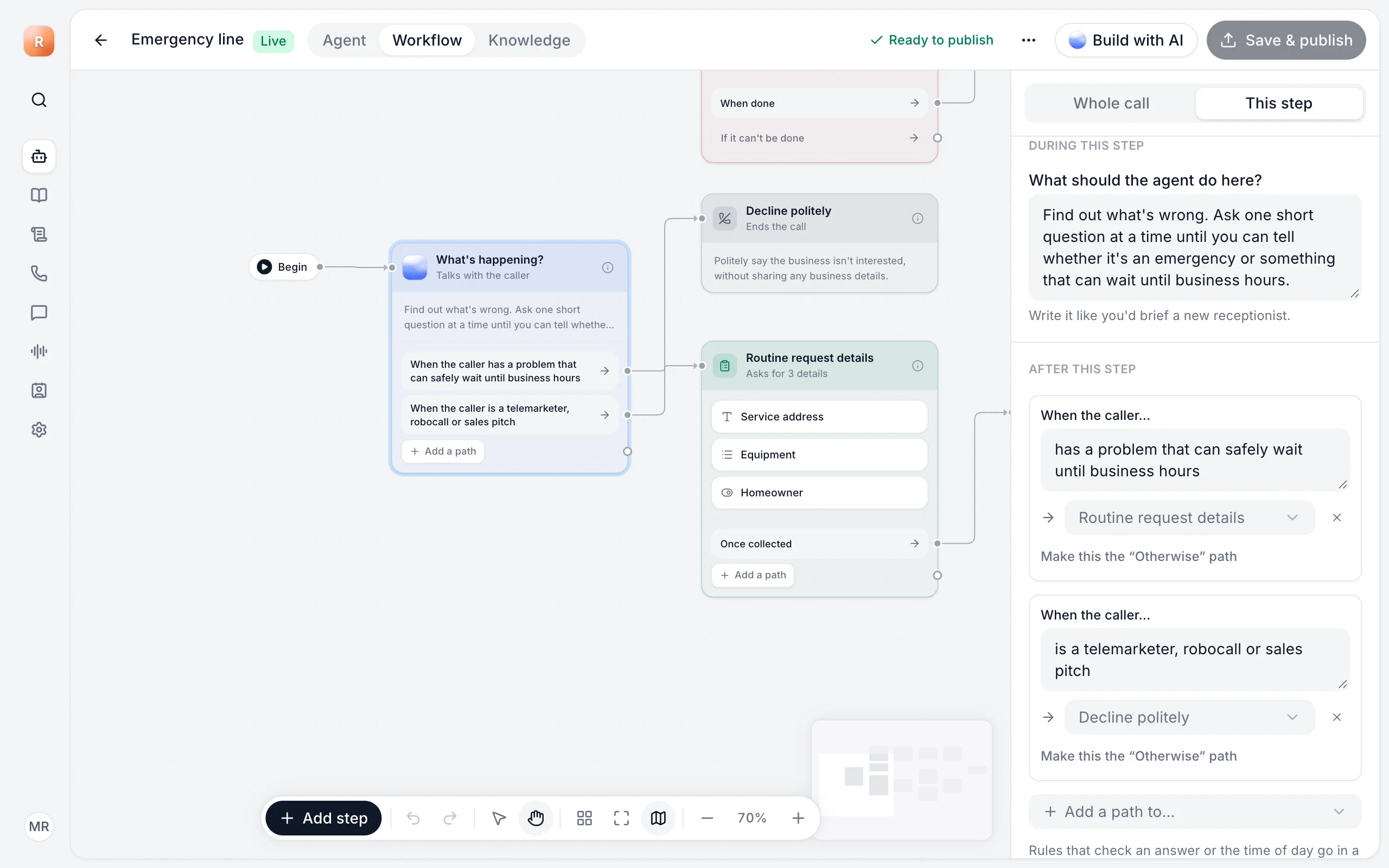
Example: a plumber's first question
Name: What's happening?
What should the agent do here? "Find out what's wrong. Ask one short question at a time until you can tell whether it's an emergency or something that can wait until business hours."
Paths:
- When the caller has a problem that can safely wait until business hours → Routine request details
- When the caller is a telemarketer, robocall or sales pitch → Decline politely
- Otherwise → Take message
What the caller hears
A normal conversation. The agent doesn't announce steps or paths, it just carries on to the next part of the call.
If the caller asks a question here, the agent answers it from your knowledge bases in a sentence or two, the way an Answer questions step does, and offers more if they want it.
What shows on the call record
The transcript and summary in Calls, like every call. See Review calls.
Limits
- Paths that check an answer or the time of day belong in a Condition step. A Talk step's paths are about what the caller says.
- The agent stays on the step until the goal is met or a path fits.
FAQ
How many paths can a Talk step have?
As many as you need. Keep each one a clear, different situation, and keep one Otherwise.
Should a Talk step greet the caller?
No. The greeting is said before the first step (set it under Whole call → Greetings), so steps shouldn't greet again.
Can a caller jump out of a Talk step?
Yes, with a rule under Whole call → Anytime the caller…, like "describes an emergency, go to Flag the emergency".
Related guides: Design how calls go with workflows, Collect info step: ask callers for specific details and Answer questions step: answer from your knowledge bases.
Still stuck?
Ask our support agent (it runs on Ladoo), or email the team.