Collect info step: ask callers for specific details
The Collect info step in a Ladoo workflow has your AI receptionist ask for the details you choose, like a service address or equipment type, and moves on once it has them.
By the Ladoo team · Updated
A Collect info step asks the caller for the details you check, one at a time, and moves on by itself once it has them. Use it when you need details in one part of the call only, like an address before booking.
When to use it
- Before booking or taking a message, to get the service address and what's wrong.
- Before a Webhook or Custom code step that needs a detail, like a ZIP code.
- To ask some questions only on some paths, like whether a caller owns the home.
Set it up
- Add the details to your agent first, under Caller info on the Agent tab. See What your agent asks callers.
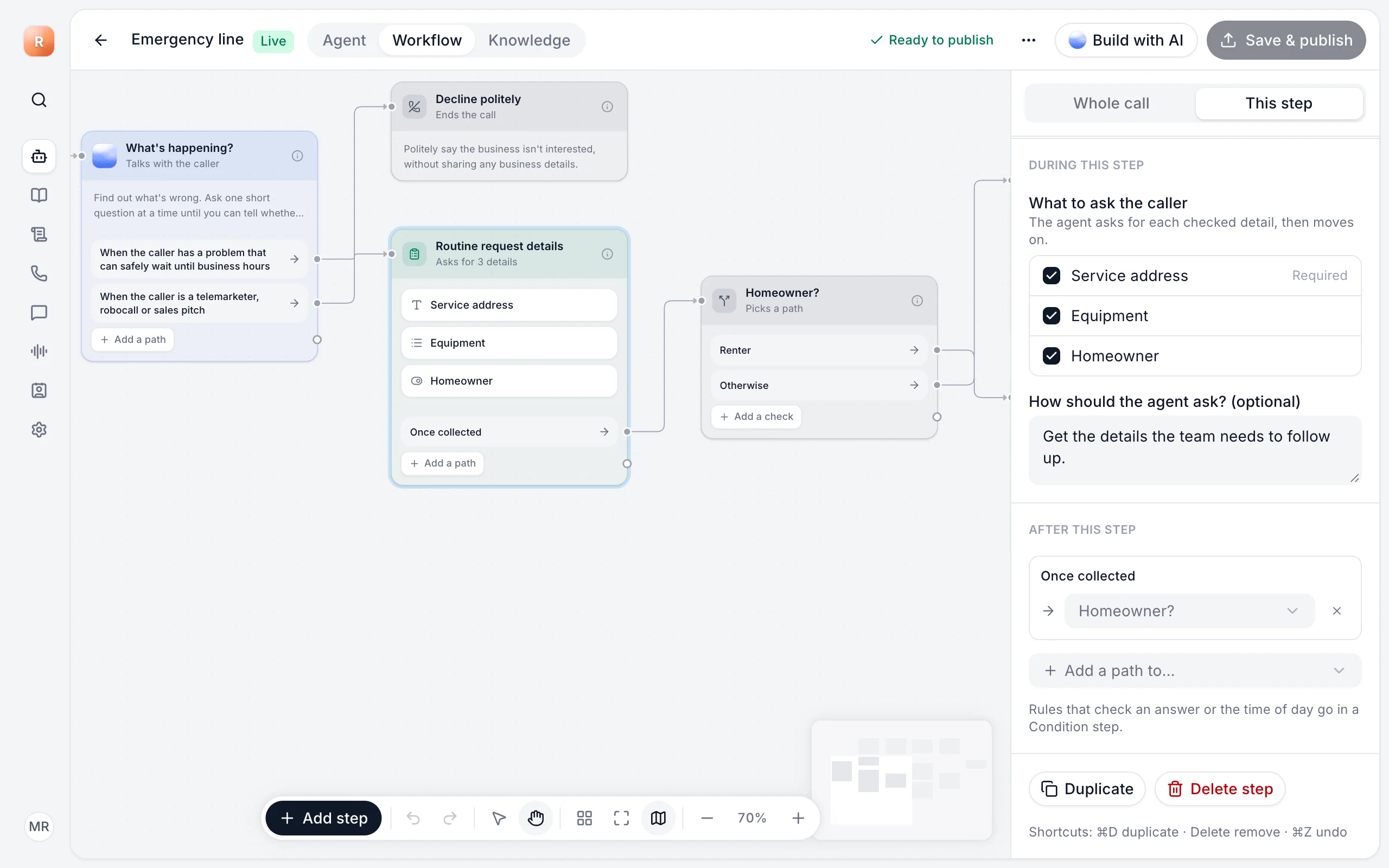
- On the Workflow tab, click Add step and choose Collect info.
- Under What to ask the caller, check each detail. The agent won't move on until it has every checked detail. To let callers skip one, tick Optional here next to it.
- Optional: under How should the agent ask?, add guidance, like "Ask one thing at a time and confirm the address back."
- Connect Once collected to the next step, and click Save & publish.
Example: an HVAC service request
Name: Routine request details
What to ask the caller: Service address, Equipment, Homeowner (Optional here)
Once collected → Homeowner? (a Condition that sends renters to take a message)
What the caller hears
The agent asks for each detail in its own words, like "What's the address where you need the work done?" If the caller already said it earlier in the call, the agent doesn't ask again.
While a caller reads out a phone number or spells an email, the agent waits a little longer before answering, so pauses between digits or letters don't cut them off. Once they're done, replies are quick again.
When a caller spells a name or email letter by letter ("R-I-V-E-R-A" or "R as in red, I as in ice…"), the agent reads it back and saves it as spelled, even if it heard the word itself differently.
What shows on the call record
Every detail the agent collected is listed on the call in Calls, and is written to your CRM with the call's note if you've connected it.
Limits
- Every checked detail has to be answered before the step finishes, unless it's marked Optional here. Optional ones are asked, but it's fine if the caller doesn't know. The Always ask or If it comes up setting on the Agent tab doesn't change this; it's for details no Collect info step checks.
- If the caller already said a detail earlier in the call, the agent uses it (or checks it with a quick yes-or-no) instead of asking again.
- For a returning caller, the name on file is used as is, whatever the detail that holds the caller's name is called (like Name, Customer name or First name). If someone else on that number gives their own name, theirs is used instead. An email on file that the step checks isn't used until the caller confirms it: the agent asks one yes-or-no question, like "Should the team use the email on your account?", without reading it out. If they give a different one, it uses that. This adds one short question to their call.
- On a phone call, the agent asks whether the number they're calling from is the best one, instead of asking for a number. Once the caller says it is (or says "this number is fine" on their own), it isn't asked again.
- If the caller asks to skip a required detail, the agent says briefly why it's needed and asks once more. It never agrees to skip it. If they still won't give it, the agent says it can't finish this without it and offers what else it can do. Mark a detail Optional here if callers should be able to leave it out.
- If the caller asks for something else partway through, like a person or a message, the call can follow that path. Details the step still needs are asked for before any booking or message that comes after it.
- If the caller tries to end the call before giving a required detail, the agent asks for it once more. If they still want to go, it lets them.
- The step waits for the caller to say something before it finishes.
- Details set to only be picked out after the call (not asked) can't be checked here.
FAQ
Where do I add a new detail?
Under Caller info on the Agent tab, with the agent's other details. It then shows up in every Collect info step.
What's the difference from the details on the Agent tab?
Details on the Agent tab can be asked anywhere in the call. A Collect info step asks for them at a specific point.
Can later steps use what the caller said?
Yes. The agent remembers it for the rest of the call. A Condition can check it, Custom code can read it, and a Webhook request or a CRM note can fill it in with {{fields.service_address}}.
Related guides: Talk step: have a conversation with a goal, Answer questions step: answer from your knowledge bases and Design how calls go with workflows.
Still stuck?
Ask our support agent (it runs on Ladoo), or email the team.