Custom code step: work things out with JavaScript
The Custom code step in a Ladoo workflow runs a short JavaScript function during the call, like working out a trip fee from the caller's ZIP code, and passes the result to later steps.
By the Ladoo team · Updated
A Custom code step runs a short JavaScript function during the call. It reads what the caller has said so far and returns values that later steps can say to the caller or check in a Condition. Use it for the rules that are specific to your business, like a trip fee by ZIP code or a ballpark quote.
When to use it
- To work out a fee or a ballpark price from the caller's answers.
- To sort a call by your own rules, like which service area an address is in.
- To turn an answer into something a Condition can check, like
trueorfalse.
Set it up
- Add the details your code needs to your agent first, under Caller info on the Agent tab, and ask for them in a Collect info step before this one.
- On the Workflow tab, click Add step and choose Custom code.
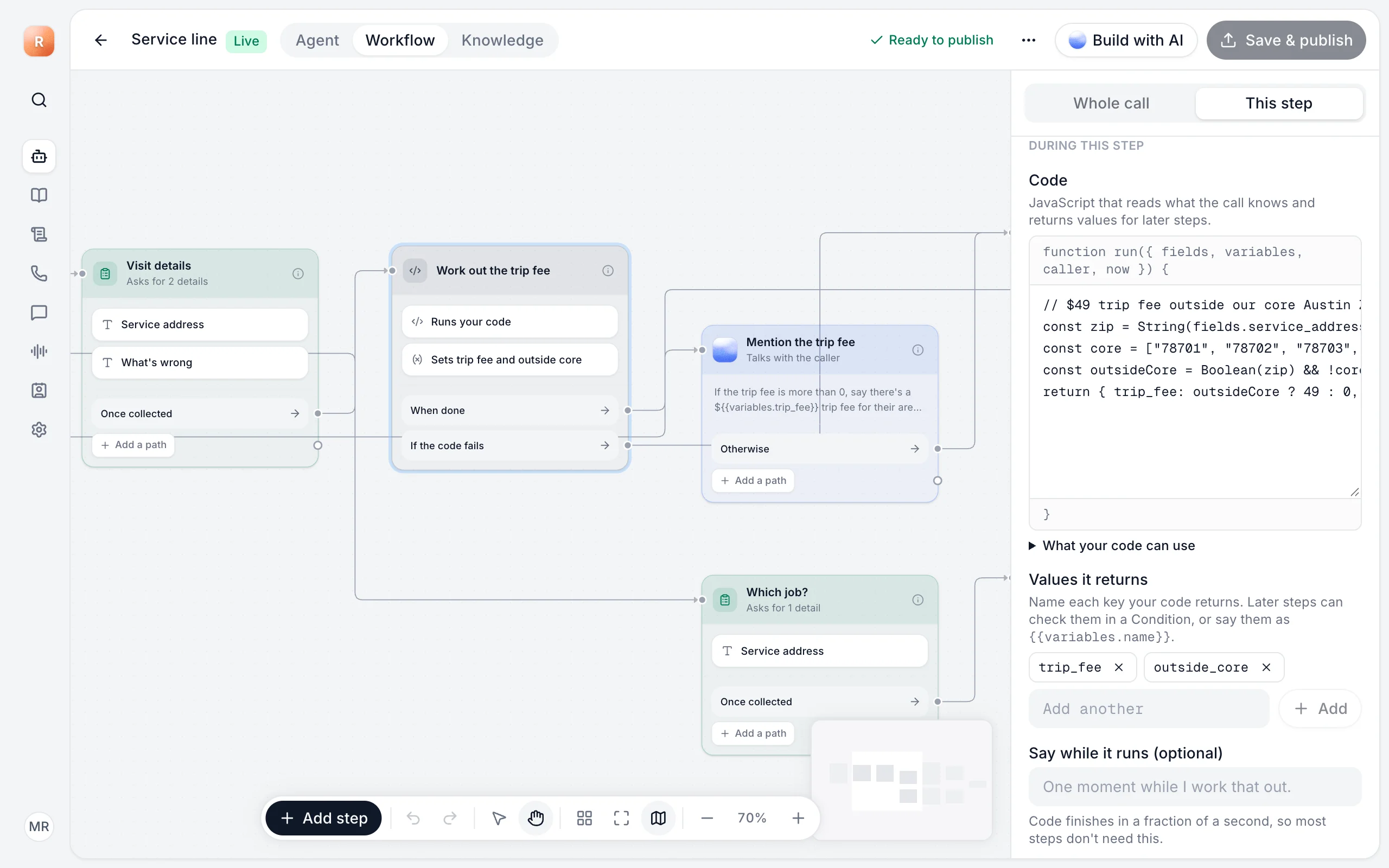
- Under Code, write the body of the function. It's given
fields,variables,callerandnow, and mustreturnan object. - Under Values it returns, add the name of each key your code returns, like
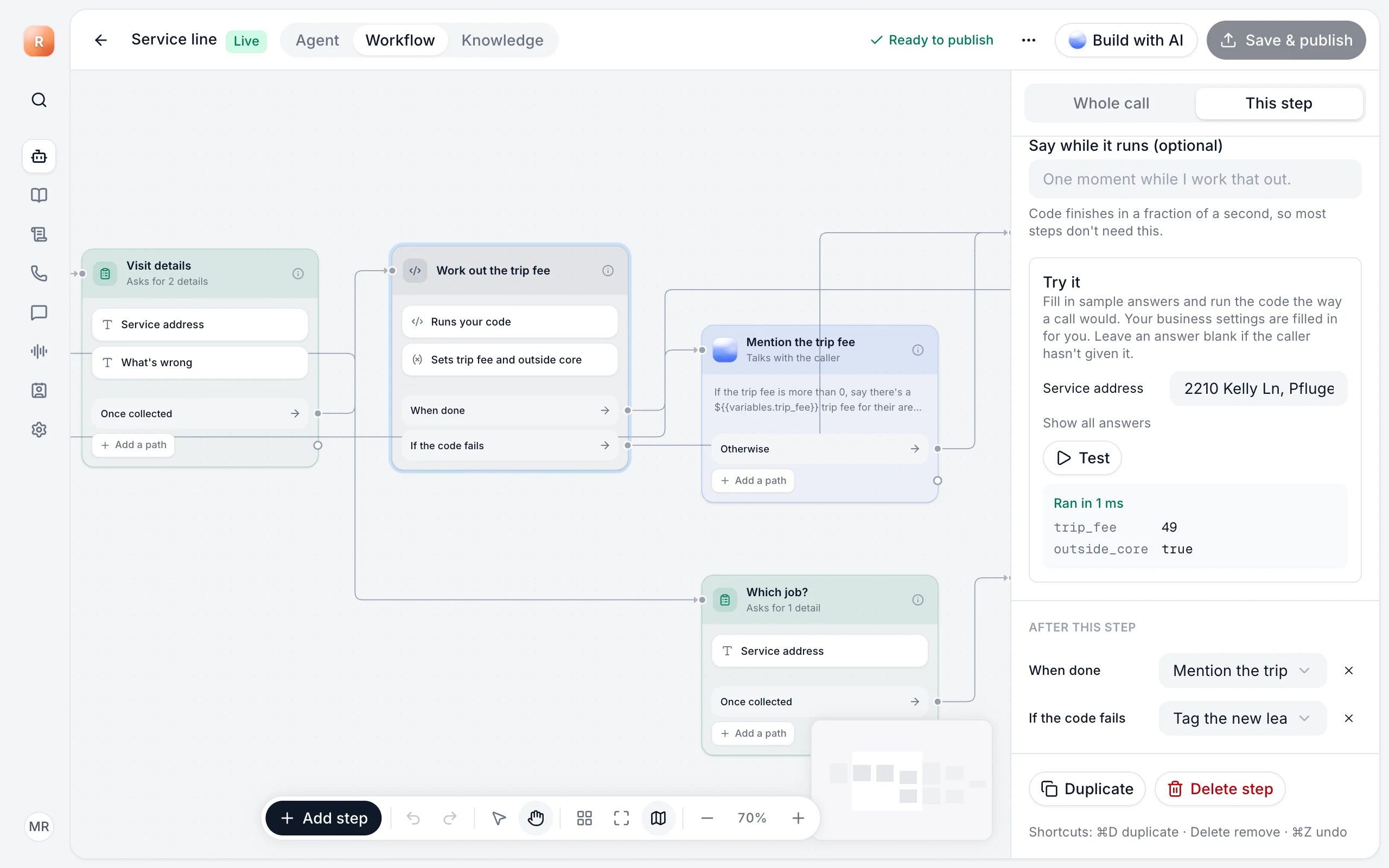
trip_fee, and click Add. - Under Try it, fill in sample answers and click Test to run the code the way a call would.
- Connect When done to the next step, and If the code fails to a step for when the code throws an error or runs too long.
- Click Save & publish.
What your code can use
| Name | What it is |
|---|---|
fields | The caller's answers, by key, like fields.service_address. |
variables | Your business settings, like variables.timezone, and values returned by earlier steps. |
caller | phone, name, first_name and email, or null when unknown. |
now | The time of the call, like 2026-11-08T15:00:00Z. |
Click What your code can use in the step to see the exact keys for your agent.
Examples
A trip fee outside your core ZIP codes
Rivera Plumbing charges $49 to drive outside central Austin.
// $49 trip fee outside our core Austin ZIP codes.
const zip = String(fields.service_address || "").match(/\b\d{5}\b/)?.[0];
const core = ["78701", "78702", "78703", "78704", "78705", "78751"];
const outsideCore = Boolean(zip) && !core.includes(zip);
return { trip_fee: outsideCore ? 49 : 0, outside_core: outsideCore };
Values it returns: trip_fee, outside_core. A Talk step can then say "There's a ${{variables.trip_fee}} trip fee for your area", and a Condition can check whether outside_core is true.
A ballpark quote from square footage
A cleaning company quotes $0.12 a square foot, with a $150 minimum.
const sqft = Number(String(fields.square_feet || "").replace(/[^\d.]/g, ""));
if (!sqft) return { quote: null };
const quote = Math.max(150, Math.round(sqft * 0.12));
return { quote, quote_range: `$${quote} to $${Math.round(quote * 1.2)}` };
Sorting a call by your own rules
An HVAC company treats no heat as a priority when the system is more than 15 years old or someone at home is vulnerable.
const age = Number(fields.system_age) || 0;
const noHeat = /no heat|not heating|cold air/i.test(String(fields.issue || ""));
const vulnerable = String(fields.vulnerable_occupant || "").toLowerCase() === "yes";
return { priority: noHeat && (age > 15 || vulnerable) };
A Condition step then sends priority calls to a Transfer step and the rest to Book appointment.
Test it
Under Try it, fill in sample answers and click Test. You'll see how long it ran and each value it returned, or the error and the note that a call would go to If the code fails. If the code returns a key that isn't listed under Values it returns, the test says so and offers to add it.
What the caller hears
Nothing, unless you add something under Say while it runs. The code finishes in a fraction of a second, so most steps don't need it.
What shows on the call record
Each run is listed under Call trace on the call in Calls, as run_code, with the values it returned and how long it took, or the error.
Limits
The code runs in a sandbox, with its own memory and nothing else:
- It can't reach the internet or files, set timers, or print. To call your own system, use a Webhook step.
- It's stopped after 200 ms and can use up to 16 MB of memory.
- The code can be up to 16 KB. What it's given can be up to 64 KB, and what it returns up to 8 KB.
- It can return up to 20 values. Each must be text, a number,
true/falseornull. - Only the values listed under Values it returns are passed on. Later steps use them as
{{variables.name}}. - Anything left running after
return, like a promise, is stopped.
FAQ
What happens if my code throws an error?
The call goes to If the code fails, so it never gets stuck. Point it at the step the call would take anyway, or at a Take message step.
What time zone is now in?
now is in UTC. Your business's time zone is in variables.timezone. To check whether you're open, a Condition step with The time of the call is simpler.
Can the code look something up in my system?
No, the code can't reach the internet. Use a Webhook step to fetch the data first, then read the saved values from variables in your code.
Related guides: Webhook step: check your own system during a call, LeadConnector step: tag, note and move contacts during a call and Flag urgent step: mark the call urgent.
Still stuck?
Ask our support agent (it runs on Ladoo), or email the team.